Getting DNS right for Private Endpoints is one of those things that looks simple on paper but trips people up constantly. I've set this up for multiple customers and the same issues come up every time. Microsoft's documentation is detailed but spreads the information across multiple pages, making it hard to see the full picture. This guide is what I wish I had when I first started working with private endpoints.
Not sure whether you need a private endpoint or a service endpoint in the first place? Start with Private Endpoints vs Service Endpoints.
Quick Setup (TLDR)
Cloud-only: Create a Private DNS Zone (e.g., privatelink.blob.core.windows.net), link it to your VNet, and make sure your VNet is using Azure-provided DNS or forwarding to 168.63.129.16. For hub-and-spoke, either link every spoke VNet to the zone or use Azure DNS Private Resolver in the hub.
Hybrid (on-premises + Azure):
- On-premises DCs: Add conditional forwarders for the public zone names (
blob.core.windows.net, notprivatelink.blob.core.windows.net). Point the forwarder IP to your Azure DNS Private Resolver or a DC in Azure. - Azure DCs: Set the server-level forwarder to
168.63.129.16. No conditional forwarders needed. - VNets: Set custom DNS to your Azure DC or Private Resolver IPs.
- Private DNS Zones: Link them to the VNet where your DNS resolver or Azure DC lives.
That's the short version. Read on for the why and common pitfalls.
How Private Endpoint DNS Works
When you create a private endpoint for an Azure service, Azure does two things behind the scenes:
- Creates a network interface with a private IP in your VNet (e.g.,
10.0.1.5) - Inserts a CNAME record in public DNS that redirects the service's FQDN into a
privatelink.*namespace
For example, if you create a private endpoint for a storage account:
mystorageaccount.blob.core.windows.net
  → CNAME → mystorageaccount.privatelink.blob.core.windows.net
This CNAME is created globally in Azure public DNS the moment you create the private endpoint. Your application connection strings stay the same, still pointing to mystorageaccount.blob.core.windows.net. The CNAME silently redirects the lookup into the privatelink.* zone where your Private DNS Zone can answer with the private IP.
Clients on the public internet follow the same CNAME but get the public IP (since they don't have your Private DNS Zone). Clients going through your Azure DNS infrastructure get the private IP. Same FQDN, different answers depending on where the query is resolved.
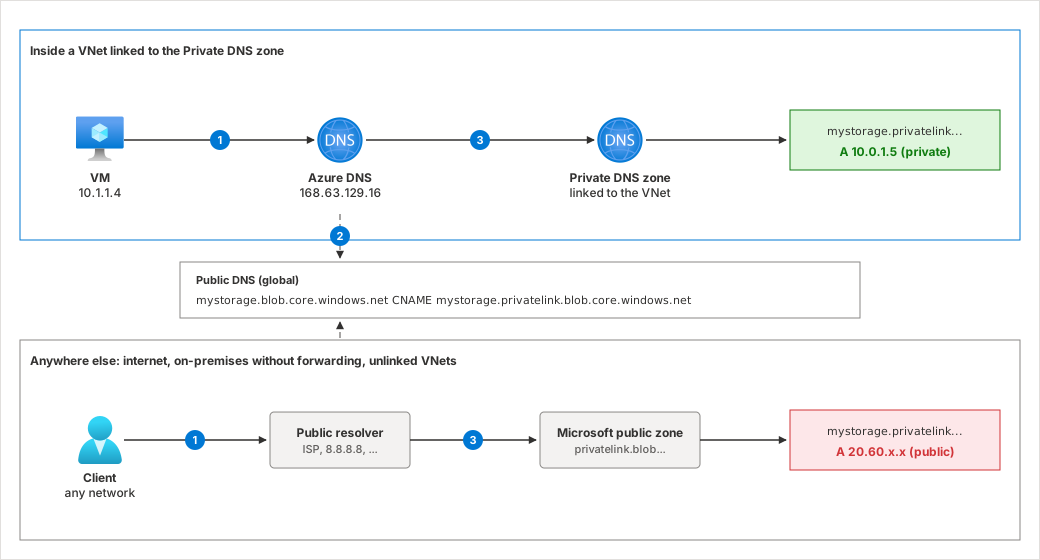
- The client asks its resolver for
mystorageaccount.blob.core.windows.net. - The resolver finds the public CNAME pointing to
mystorageaccount.privatelink.blob.core.windows.net. - Inside a linked VNet, Azure DNS answers the
privatelinkname from your Private DNS Zone with the private IP. Everywhere else, theprivatelinkname resolves through Microsoft's public zone to the public IP.
Cloud-Only Setup
If all your workloads are in Azure with no on-premises connectivity, the setup is straightforward.
Default DNS (no custom DNS servers)
When your VNet uses Azure-provided DNS (the default), VMs automatically query 168.63.129.16. This is a virtual IP present in every Azure VNet that provides DNS, DHCP, health probes, and VM agent communication.
All you need:
- Create a Private DNS Zone for the service type (e.g.,
privatelink.blob.core.windows.net) - Link the zone to your VNet
- Make sure the private endpoint has a DNS zone group pointing at the zone, so its A record gets added (see below)
That's it. Azure DNS resolves the CNAME, checks linked Private DNS Zones, and returns the private IP.
Getting the A record into the zone
The A record isn't added by magic. It's managed by a private DNS zone group on the private endpoint. When you create a private endpoint in the portal and select Integrate with private DNS zone, the portal creates the zone group for you, and the record is created, updated and removed together with the endpoint.
From the CLI, Bicep or Terraform you have to create the zone group yourself, for example with az network private-endpoint dns-zone-group create. If you skip it, the endpoint deploys fine but no A record is created, and clients keep resolving the public IP. I see this regularly with endpoints deployed from pipelines.
In larger hub-and-spoke environments, the common pattern is to let Azure Policy handle it. The Azure Landing Zones initiative Configure Azure PaaS services to use private DNS zones uses DeployIfNotExists policies to add the zone group to every new private endpoint and point it at the central zones in the hub. Application teams create the endpoint, and the platform team's policy wires up DNS. If you go this way, don't also create zone groups in your own code.
Important: The Private DNS Zone only resolves for VNets that are directly linked to it. If you have a single VNet this is straightforward, but in a hub-and-spoke topology you need to think about this more carefully.
Hub-and-spoke topology
Without a centralized DNS resolver, every spoke VNet that needs to resolve private endpoints must be directly linked to the Private DNS Zone. Azure DNS at 168.63.129.16 only checks zones linked to the VNet where the query originates. It doesn't follow peering or traverse hub networks. If a spoke VNet isn't linked, queries return the public IP instead of the private one.
This works fine for small setups, but I've seen it become a real headache as environments grow. If you have 10 Private DNS Zones and 20 spoke VNets, that's 200 zone links to manage. Every time you add a spoke or a new service type, someone needs to remember to link them. And they won't.
For larger environments, use Azure DNS Private Resolver to centralize resolution and avoid the zone-linking multiplication:
- Deploy the Private Resolver in your hub VNet (the inbound endpoint needs its own subnet, delegated to
Microsoft.Network/dnsResolvers) - Link all Private DNS Zones to the hub VNet only
- Configure spoke VNets to use the resolver's inbound endpoint IP as their DNS server (the inbound endpoint receives queries from clients and VNets, while the outbound endpoint is used for forwarding rules to on-premises or external DNS)
Now spoke VNets don't need direct links to the zones. Their queries are forwarded to the resolver in the hub, which has access to all linked zones. One zone link per service type instead of one per spoke.
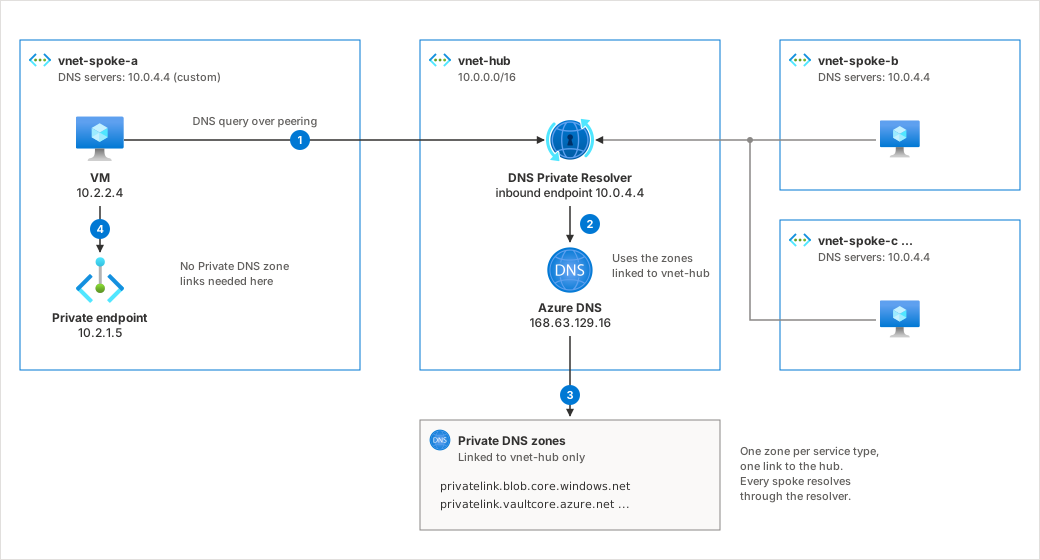
- The VM in the spoke sends its DNS query to the resolver's inbound endpoint (
10.0.4.4), which the spoke has configured as its DNS server. - The resolver hands the query to Azure DNS (
168.63.129.16) from inside the hub. - Azure DNS checks the Private DNS Zones linked to the hub and returns the private endpoint's IP.
- The VM connects directly to the private endpoint. DNS went through the hub, but the traffic doesn't have to.
When you have custom DNS servers on the VNet
If your VNet has custom DNS configured (e.g., domain controllers for Active Directory), VMs no longer query 168.63.129.16 directly. This means Private DNS Zone links aren't consulted automatically.
Your custom DNS server must forward queries to 168.63.129.16 to re-enter the Azure DNS resolution path. Set it as a server-level forwarder on the DNS server. Without this forwarder, Private DNS Zones are effectively invisible to your workloads.
Hybrid Setup (On-Premises + Azure)
This is where I spend most of my time troubleshooting. The goal is simple: on-premises clients should resolve Azure private endpoints to their private IPs, not the public ones. But without proper planning upfront, this can get messy fast.
On-premises DNS servers
Add conditional forwarders for the public DNS zone names of the Azure services you're using. For example:
blob.core.windows.net(notprivatelink.blob.core.windows.net)database.windows.net(notprivatelink.database.windows.net)vaultcore.azure.net(notprivatelink.vaultcore.azure.net)
The forwarder IP should point to something in Azure that can resolve private endpoints:
- Azure DNS Private Resolver inbound endpoint IP (recommended)
- Domain controller in Azure that forwards to
168.63.129.16 - DNS forwarder VM in Azure
Note that 168.63.129.16 is only reachable from within Azure. It's a virtual IP on the host node, not a routable address. You cannot use it as a forwarder IP on your on-premises DNS servers. That's why you need something in Azure (Private Resolver, DC, or forwarder VM) to act as the intermediary.
You do not need to set up the privatelink.* zones on your on-premises DNS servers. Use the public zone names only.
Why the public zone name matters
This is the most common mistake I see. If you set up a conditional forwarder for privatelink.blob.core.windows.net, it won't do anything useful. Your DNS server still handles the initial query for blob.core.windows.net the normal way and resolves it to the public IP. The forwarder never kicks in because the query never matches privatelink.* directly. That redirect only happens through the CNAME, and the CNAME lives under the public zone. So your forwarder has to sit on blob.core.windows.net to catch the query before it goes anywhere else.
Azure-side DNS servers
On your domain controllers or DNS forwarder VMs in Azure:
- Set the server-level forwarder to
168.63.129.16 - In most cases, you don't need to create conditional forwarder zones for each
privatelink.*zone (as long as zones are properly linked to the VNet)
When the Azure DNS server forwards to 168.63.129.16, Azure DNS handles the full chain: resolves the CNAME, checks linked Private DNS Zones, and returns the private IP. The Private DNS Zones just need to be linked to the VNet where the DNS server lives.
VNet DNS settings
Set the domain controller or Azure DNS Private Resolver IP addresses as custom DNS on your virtual networks. This ensures VMs and other resources in those VNets use your DNS infrastructure instead of Azure-provided DNS directly.
AD-integrated DNS: Conditional forwarder replication
This one bit me the first time I set up a hybrid environment. If your domain controllers use AD-integrated DNS, be careful with conditional forwarder replication. When you create a conditional forwarder and store it in Active Directory, you can choose a replication scope:
- All DNS servers in the forest (replicates everywhere, including Azure DCs)
- All DNS servers in the domain (same issue, Azure DCs in the domain get it too)
- All domain controllers in the domain (legacy option, also replicates to Azure)
- Custom directory partition (you control exactly which DCs participate)
- Not stored in AD (local only, no replication)
The problem: if you replicate a conditional forwarder for blob.core.windows.net (pointing to the Private DNS Resolver) to all DCs in the domain, your Azure DCs will also get it. Those Azure DCs don't need it because they already resolve private endpoints through their server-level forwarder to 168.63.129.16. At best it's an unnecessary extra hop, at worst it creates confusion.
Two approaches to handle this:
Option 1: Don't replicate (simple). Disable AD replication for the conditional forwarders and set them up manually on each on-premises DC. On Azure DCs, don't create them at all since the server-level forwarder to 168.63.129.16 already handles everything. This is straightforward and works well for smaller environments.
Option 2: Custom DNS application directory partition (scalable). Create a custom partition that only your on-premises DCs are enlisted in:
# Create the partition
Add-DnsServerDirectoryPartition -Name "AzurePrivateDns.contoso.com"

# Enlist each on-premises DC
Register-DnsServerDirectoryPartition -Name "AzurePrivateDns.contoso.com" -ComputerName "DC-ONPREM1"
Register-DnsServerDirectoryPartition -Name "AzurePrivateDns.contoso.com" -ComputerName "DC-ONPREM2"
# Do NOT enlist Azure DCs

# Create the conditional forwarder using the custom partition
Add-DnsServerConditionalForwarderZone `
    -Name "blob.core.windows.net" `
    -MasterServers 10.10.0.4 `
    -ReplicationScope Custom `
    -DirectoryPartitionName "AzurePrivateDns.contoso.com"
This way the conditional forwarders replicate automatically across all on-premises DCs but never reach the Azure ones. Better for larger environments where manually configuring each DC isn't practical.
The Full Resolution Flow (Hybrid)
Here's what happens step by step when an on-premises client queries mystorageaccount.blob.core.windows.net:
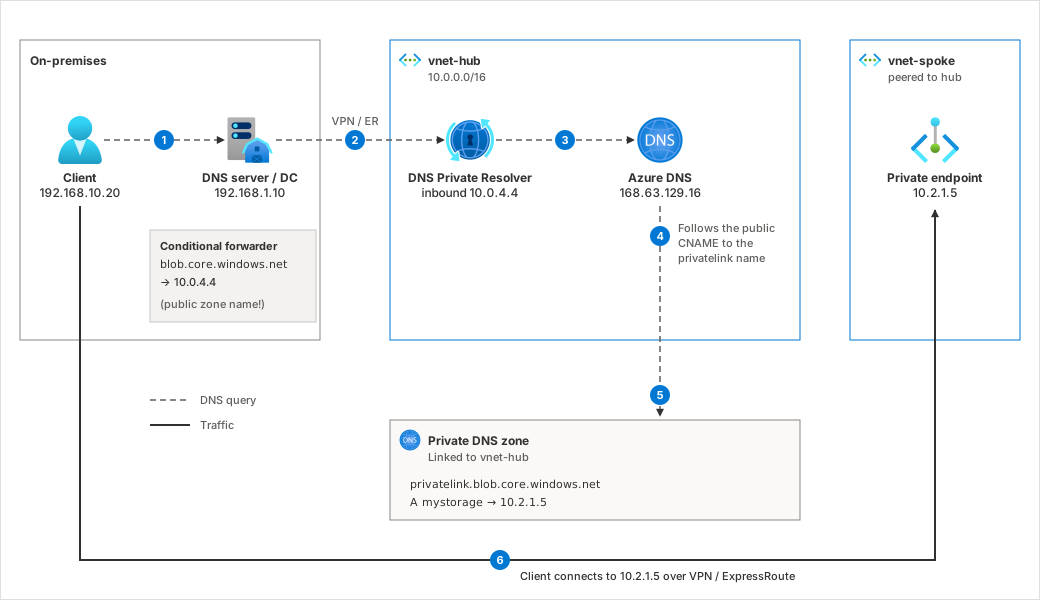
- The client asks the on-premises DNS server.
- The DNS server matches the conditional forwarder for
blob.core.windows.netand forwards the query over VPN/ExpressRoute to the Azure DNS Private Resolver inbound endpoint (or a forwarder VM). - The resolver forwards the query to
168.63.129.16. - Azure DNS follows the public CNAME:
mystorageaccount.blob.core.windows.net→mystorageaccount.privatelink.blob.core.windows.net. - Azure DNS checks the Private DNS Zones linked to the hub VNet and finds the A record
mystorageaccount.privatelink.blob.core.windows.net→10.2.1.5. The answer travels back through the chain to the client. - The client connects to
10.2.1.5over VPN/ExpressRoute.
Quick Verification
Test from a VM in a linked VNet or from on-premises (after setting up forwarders):
nslookup mystorageaccount.blob.core.windows.net
- Correct: Returns a private IP (10.x.x.x or 172.x.x.x)
- Wrong: Returns a public IP, which means you need to check your DNS forwarders and zone links
When Does Public Resolution Still Work?
This is a question I get asked a lot: if you have a Private DNS Zone for privatelink.blob.core.windows.net linked to your VNet, can you still access storage accounts that don't have private endpoints?
Yes, this works fine. The key is understanding the CNAME. Azure only creates the CNAME redirect from storageA.blob.core.windows.net → storageA.privatelink.blob.core.windows.net when you create a private endpoint for that specific resource. If storageB has no private endpoint, there's no CNAME. The query for storageB.blob.core.windows.net resolves directly to its public IP through normal DNS. Your Private DNS Zone is never consulted because the query never enters the privatelink.* namespace.
So in a standard setup, private and public resolution coexist without issues. Resources with private endpoints resolve to private IPs, resources without them resolve to public IPs.
The NXDOMAIN Edge Case
There is one scenario where this breaks. If a resource has a private endpoint somewhere else (a different tenant, subscription, or VNet that has its own Private DNS Zone), the CNAME to privatelink.* exists in public DNS, but the A record is not in your Private DNS Zone.
For example: storageC belongs to another team and they created a private endpoint for it in their VNet. Public DNS now returns storageC.blob.core.windows.net → storageC.privatelink.blob.core.windows.net. When your DNS infrastructure follows this CNAME, it hits your Private DNS Zone for privatelink.blob.core.windows.net. Your zone is authoritative but has no A record for storageC, so it returns NXDOMAIN. Resolution fails.
Microsoft introduced Fallback to Internet to address this. When enabled on a virtual network link, NXDOMAIN responses from the Private DNS Zone fall back to public DNS instead of failing. Enable it with the resolutionPolicy set to NxDomainRedirect:
az network private-dns link vnet create \
  --zone-name "privatelink.blob.core.windows.net" \
  --virtual-network myVNet \
  --registration-enabled false \
  --resolution-policy NxDomainRedirect
This is mainly relevant in multi-tenant or multi-region setups where private endpoints for the same service type exist across different environments.
Common Mistakes
These are the issues I run into most often when helping customers set up private endpoints.
-
Forwarding to the
privatelink.*zone instead of the public zone. The conditional forwarder must be forblob.core.windows.net, notprivatelink.blob.core.windows.net. -
Not linking the Private DNS Zone to the right VNet. The zone must be linked to the VNet where your DNS resolver or forwarder lives, not just the VNet where the private endpoint is deployed.
-
Windows DNS forwarding timeout too low. If using Windows DNS servers forwarding to
168.63.129.16, raise the server-level forwarding timeout (Set-DnsServerForwarder -Timeout). The default is 3 seconds, which can be too short, especially over ExpressRoute or VPN where latency varies. If it times out, the server falls back to root hints and resolves the public IP instead. Keep the whole chain within the server's overall recursion timeout (8 seconds by default,Set-DnsServerRecursion -Timeout), or the server gives up with SERVFAIL before it gets there. This one is particularly frustrating to debug because it works intermittently. -
Creating multiple zones with the same name. In hub-and-spoke, create one
privatelink.blob.core.windows.netzone and link it to all VNets. Don't create separate zones per spoke. -
Missing zones for multi-zone services. Some services require multiple DNS zones. Azure Monitor needs
privatelink.monitor.azure.com,privatelink.oms.opinsights.azure.com,privatelink.ods.opinsights.azure.comand more. Azure Backup needsprivatelink.blob.core.windows.netandprivatelink.queue.core.windows.neton top of its own backup zone. Storage accounts need separate zones for blob, queue, table, and file if you use private endpoints for each. Miss one and that sub-service fails to resolve. Check the DNS zone reference for the full list per service. -
Private endpoint in a different VNet than the zone link. If you create a private endpoint in a spoke VNet but only link the Private DNS Zone to the hub, resolution only works if spoke VNets forward DNS through the hub (via Private Resolver or a DNS forwarder). If spokes use Azure-provided DNS directly, the zone must also be linked to the spoke VNet.
-
Blocking
168.63.129.16. This IP must be reachable on port 53 from any VM acting as a DNS forwarder. Local firewall rules that block it will break the entire chain. -
Private endpoint created without a DNS zone group. Common with endpoints deployed from CLI, Bicep or Terraform. The endpoint works, but no A record lands in the zone, so everything resolves to the public IP. Add the zone group, or let Azure Policy add it (see Getting the A record into the zone).
-
Forwarding ruleset rule for a zone that's also linked. If a VNet has a Private DNS Zone linked and a DNS Private Resolver forwarding ruleset with a rule for the same namespace, the linked zone always wins and the rule is silently ignored. Pick one per namespace.
References
- Private Endpoints vs Service Endpoints: Which One Should You Use? (Azure Hub guide)
- Azure Private Endpoint DNS zone values
- Private Endpoint DNS integration
- What is IP address 168.63.129.16
- Azure DNS Private Resolver for hybrid DNS
- Private DNS zone groups
- Private Link and DNS integration at scale (Azure Policy)
- Windows DNS forwarder and conditional forwarder timeouts
- Private DNS Zones across VNets
- Azure Private DNS Zone Fallback to Internet