WTF Is a Service Endpoint?
Almost everyone who works with Azure runs into private endpoints sooner or later. Service endpoints are a different story. Plenty of people have never heard the term, even though they may already be using them.
That's because the portal barely uses the name. On a storage account's Networking blade, Public network access has these main options:
| Option | What it means |
|---|---|
| Enabled from all networks (default) | The public endpoint is open to the internet. No service endpoints involved. |
| Enabled from selected networks | Only the VNets and IPs you add get in. Adding a subnet here quietly turns on the Microsoft.Storage service endpoint on that subnet. |
| Disabled | No public access at all, usually combined with a private endpoint. |
So the feature people think of as "locking it down to my VNet" lives under a setting called public network access. Your VMs still connect to the same public endpoint. Their traffic just arrives over the Azure backbone tagged with the subnet's identity, so the storage firewall can say "only this subnet".
A private endpoint works the other way around. It gives the resource a private IP inside your VNet, and you can switch public access off. The difference usually only shows up later, when someone tries to reach the resource from on-premises or the firewall team asks why they can't see the traffic.
This guide covers how each one works, what the traffic looks like, the pros and cons, and what I wish I'd known before rolling them out.
Quick Answer (TLDR)
- Service endpoint: a subnet setting. Traffic still goes to the service's public IP, but over the Azure backbone with your private source IP, so the service firewall can allow "this subnet". Free and no DNS changes, but doesn't work from on-premises and doesn't limit which resources of that service the subnet can reach.
- Private endpoint: a NIC with a private IP in your VNet for one specific resource. Reachable from the VNet, peered VNets and on-premises over VPN/ExpressRoute, and public access can be turned off. Costs money and requires DNS work (see the Private Endpoint DNS guide).
Default choice: private endpoints for production, anything reached from on-premises and anything with data exfiltration requirements. Service endpoints where cost or simplicity matters more and all traffic starts in Azure, or for platform dependencies such as a firewall subnet reaching Storage.
How Service Endpoints Work
You enable a service endpoint on a subnet for a service type, such as Microsoft.Storage or Microsoft.Sql. That changes two things for traffic from the subnet to that service:
- Routing: Azure adds routes for the service's public prefixes with next hop
VirtualNetworkServiceEndpoint, so traffic goes straight to the service over the backbone. - Identity: the request arrives with the VM's private IP as the source, tagged with its VNet and subnet. That's what a "virtual network rule" on the resource matches.
DNS doesn't change. mystorage.blob.core.windows.net still resolves to the public IP, and the public endpoint is still there. You're only restricting who can use it.
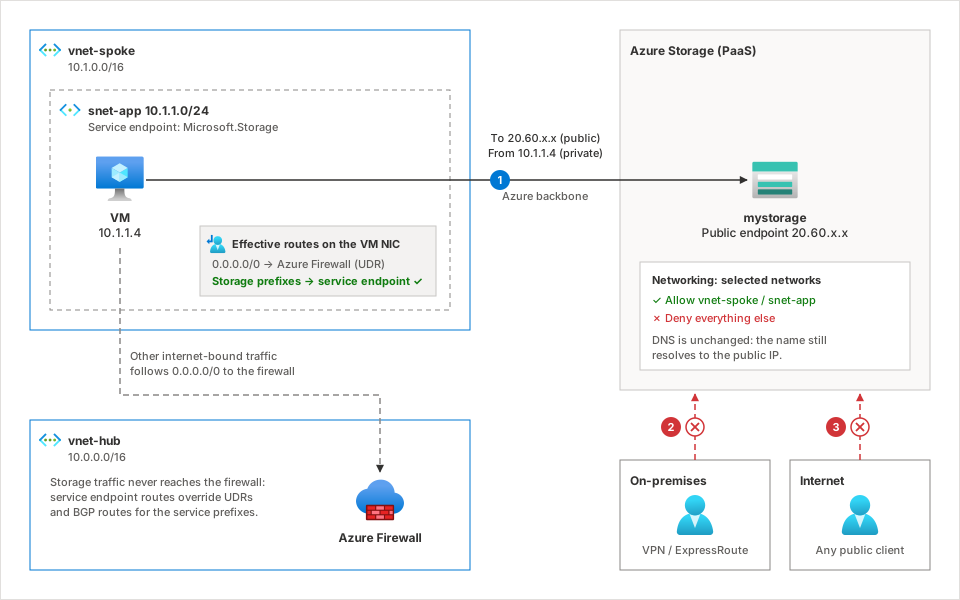
- The VM connects to the storage account's public IP over the backbone, with source
10.1.1.4. The storage firewall allowsvnet-spoke/snet-app, so it works. - An on-premises client isn't covered. It reaches the public endpoint from a public NAT IP and is rejected unless you allow that IP.
- Internet clients are rejected by the network rules.
How Private Endpoints Work
A private endpoint is a network interface in your subnet with a private IP (here 10.2.1.5), connected through Private Link to one resource and sub-resource, such as mystorage / blob. To the network, the storage account now lives at 10.2.1.5.
Anything that can route to that IP can use it: the same VNet, peered VNets (which get a /32 route to the endpoint) and on-premises over VPN or ExpressRoute.
DNS is what makes it work. Creating the endpoint adds a public CNAME from mystorage.blob.core.windows.net to mystorage.privatelink.blob.core.windows.net, and your Private DNS zone answers that name with 10.2.1.5. Applications keep using the normal FQDN. This is where most problems come from, so read the Private Endpoint DNS guide if you haven't set it up before.
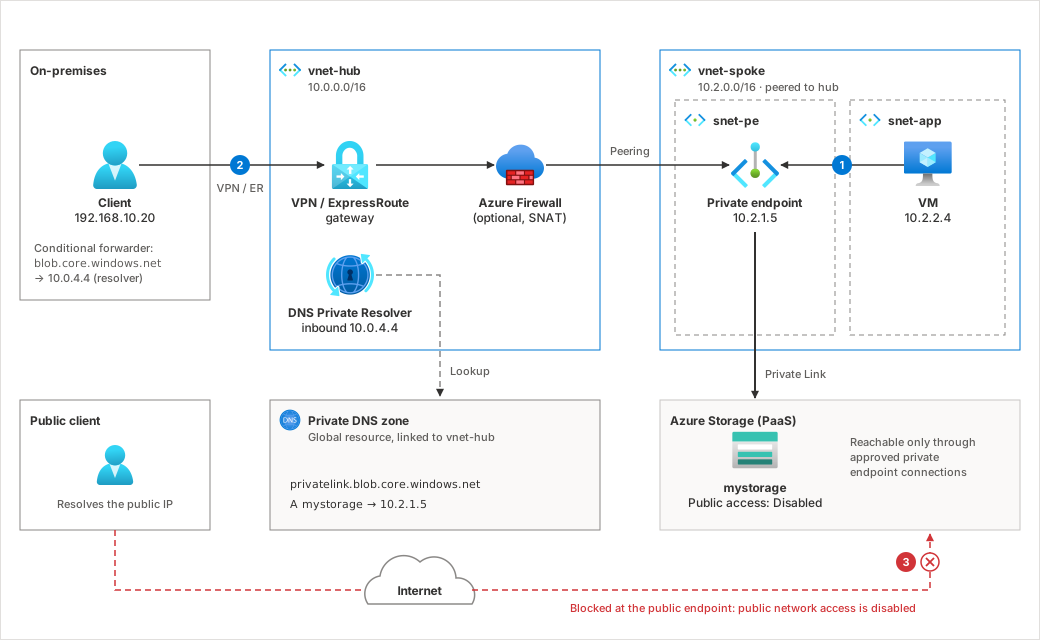
- The VM resolves the storage FQDN to
10.2.1.5and connects directly. The endpoint passes the traffic to the storage account over Private Link. - The on-premises client's DNS forwards
blob.core.windows.netto the DNS Private Resolver in the hub and gets10.2.1.5back (see the hybrid setup). Traffic then goes over VPN/ExpressRoute, optionally through the firewall, to the endpoint. Private IPs the whole way. - Public network access is disabled, so a public client crossing the internet is rejected at the public endpoint.
Side-by-Side Comparison
| Service Endpoint | Private Endpoint | |
|---|---|---|
| What you deploy | A setting on a subnet | A NIC with a private IP, plus a DNS record |
| Scope | A service type (all storage accounts, all SQL servers) | One resource and sub-resource |
| Destination IP | Service's public IP | Private IP in your VNet |
| DNS changes | None | Private DNS zone and forwarding |
| From on-premises | No (only by allowing public NAT IPs) | Yes, over VPN/ExpressRoute |
| From peered VNets | Only if enabled on their subnets too | Yes |
| Public endpoint can be disabled | No, it's restricted with network rules | Yes |
| Data exfiltration protection | Weak (Service Endpoint Policies help for Storage) | Strong, only the mapped resource is reachable |
| Other regions | Per service: Storage needs Microsoft.Storage.Global, SQL Database is same-region only | Yes, the resource can be in another region |
| Cost | Free | Per endpoint per hour, plus per GB processed |
| Routing | Service prefixes bypass your UDRs and BGP routes | A /32 route per endpoint, also in peered VNets |
| Service support | A limited list of services | Most PaaS services, plus your own via Private Link Service |
| Setup effort | Minutes | DNS, IP planning and approval workflow |
Pros and Cons
Service endpoints
Pros
- Free. No hourly or per-GB charge.
- Simple. One setting on the subnet and one rule on the resource. No DNS or IP planning.
- Nothing changes for clients. Same FQDN, same public IP.
- Works across subscriptions and tenants.
Cons
- Azure-only. On-premises clients can't use them.
- Per subnet. Every subnet that needs access must have the endpoint, including in peered VNets.
- Exfiltration risk. The subnet can still reach any storage account its egress allows, including one in someone else's subscription. Service Endpoint Policies close this gap for Storage.
- The public endpoint stays. Some compliance frameworks don't accept that.
- Bypasses your firewall (see below).
Private endpoints
Pros
- Truly private. The resource gets a private IP and public access can be turned off.
- Works from anywhere routable: peered VNets, other regions and on-premises.
- Per-resource scope. An endpoint for
mystoragecan't reachattackerstorage. - Standard network controls. NSGs and UDRs apply once network policies are enabled on the subnet.
- Broad support, including your own services through Private Link Service.
Cons
- Costs money. Small per endpoint, but it adds up with hundreds of endpoints and heavy traffic.
- DNS is mandatory and easy to get wrong. A missing zone link, DNS zone group or forwarder silently sends clients to the public IP. See the common mistakes.
- Uses IP addresses and needs subnet planning. Some services need several endpoints (blob, file, queue and table are separate sub-resources).
- More moving parts: approvals, zone records, network policies and route tables.
Things That Are Good to Know
Service endpoints bypass your firewall
Service endpoint routes override UDRs and BGP routes for the service's prefixes. If your spoke sends 0.0.0.0/0 to Azure Firewall and you enable a Microsoft.Storage service endpoint there, Storage traffic skips the firewall.
If you need inspection, enable the service endpoint on the firewall's subnet instead and allow that subnet on the resource.
Private endpoints can bypass your firewall too
Each private endpoint adds a /32 route (next hop InterfaceEndpoint) in its VNet and in peered VNets. The most specific route wins, so a UDR like 10.0.0.0/8 → firewall doesn't catch it.
To send that traffic through a firewall:
- Enable private endpoint network policies for route tables on the endpoint's subnet. A UDR for the VNet's address range (for example
10.2.0.0/16) or something more specific then overrides the/32. Broader routes like10.0.0.0/8or0.0.0.0/0still don't. - Or add a
/32UDR per endpoint. That works, but a route table holds at most 400 routes. - Make the firewall SNAT the traffic so the return path is symmetric. Azure Firewall always SNATs traffic matched by application rules. With network rules or a third-party NVA, configure SNAT yourself.
At scale, a dedicated VNet or subnet for private endpoints, covered by one route, is the easiest to manage.
NSGs on the private endpoint subnet don't apply by default
Private endpoint network policies are off by default, so an NSG on the endpoint's subnet isn't evaluated for endpoint traffic. Filter on the source subnet, or enable network policies for NSGs.
Enabling a service endpoint drops existing connections
Turning a service endpoint on or off changes the source IP the service sees, from public to private or back. Existing TCP connections are closed, and resource firewall rules that allowed your VNet's public IP stop matching. Do it in a maintenance window.
A private endpoint doesn't close the public endpoint
Creating a private endpoint leaves public access as it was. Set Public network access to Disabled (or restrict it) yourself, or the resource stays reachable from the internet.
You can use both at the same time
A common pattern is private endpoints for applications and on-premises access, plus a service endpoint on a platform subnet. If a client has both, the private endpoint wins: DNS returns the private IP, so the client never reaches the public endpoint.
Watch out for multi-sub-resource services
A blob private endpoint doesn't cover file, queue, table or dfs. Each sub-resource needs its own endpoint and DNS zone, and services like Azure Monitor and Azure Backup need several zones. See the DNS zone reference.
Trusted Microsoft services
Locking a resource down with either approach can break Azure services that reach it from Microsoft's side, such as Azure Backup, Site Recovery or Event Grid. Many resources offer an Allow trusted Microsoft services exception or resource instance rules for this. Check before you turn public access off.
Network Security Perimeter
For PaaS-to-PaaS access, such as a Key Vault that only a specific storage account should reach, look at Network Security Perimeter. It's built for that case and saves you from creating private endpoints just to connect two PaaS services.
Decision Guide
| Scenario | Recommendation |
|---|---|
| Clients on-premises need access | Private endpoint |
| Compliance requires no public endpoint | Private endpoint |
| Data exfiltration is a concern | Private endpoint (or service endpoint plus Service Endpoint Policies for Storage) |
| Hub-and-spoke with many spokes using a shared resource | Private endpoint in a shared or dedicated VNet |
| Dev/test, Azure-only traffic, cost-sensitive | Service endpoint |
| A firewall or NVA subnet needs to reach Storage or SQL | Service endpoint on the firewall subnet |
| Service doesn't support private endpoints | Service endpoint, if supported |
Quick Verification
Service endpoint: the effective routes on a NIC in the subnet should show the service's prefixes with next hop VirtualNetworkServiceEndpoint:
az network nic show-effective-route-table \
  --resource-group myResourceGroup \
  --name myVmNic \
  --output table
The resource's diagnostic logs should also show the caller's private IP as the source.
Private endpoint: the FQDN should resolve to the private IP, and the NIC's effective routes should include a /32 with next hop InterfaceEndpoint:
nslookup mystorage.blob.core.windows.net
# Expected: mystorage.privatelink.blob.core.windows.net -> 10.2.1.5
If you get a public IP, the problem is DNS, not the endpoint. The Private Endpoint DNS guide lists the usual causes.
References
- Azure virtual network service endpoints
- What is a private endpoint?
- Private Endpoint DNS Setup for Hybrid and Cloud-Only Environments (Azure Hub guide)
- Azure Storage firewall rules and network access control
- Private Link FAQ (includes service endpoint questions)
- Manage network policies for private endpoints
- Azure Firewall scenarios to inspect traffic destined to a private endpoint
- Virtual network service endpoint policies for Azure Storage
- Network Security Perimeter
- Azure Private Link pricing